
MongoDB
Setup
To setup a MongoDB connection, you need to at least provide a Connection String and a DB Name.
Connection String
-
The simplest:
mongodb://username:password@hostname:port/dbname -
With SSL enabled:
mongodb://username:password@hostname:port/dbname?ssl=true -
With SSL enabled and self-signed certificates (disables certificate verification):
mongodb://username:password@hostname:port/dbname?ssl=true&ssl_cert_reqs=CERT_NONE
If needed, you can pass additional connection options in the query string. See full details in [MongoDB’s documentation](https://docs.mongodb.com/manual/reference/connection-string /#connection-options).
You might notice that there is a separate field for the DB Name in the data source configuration and we also include it in the connection string. This is usually required on shared hosts like MLab.
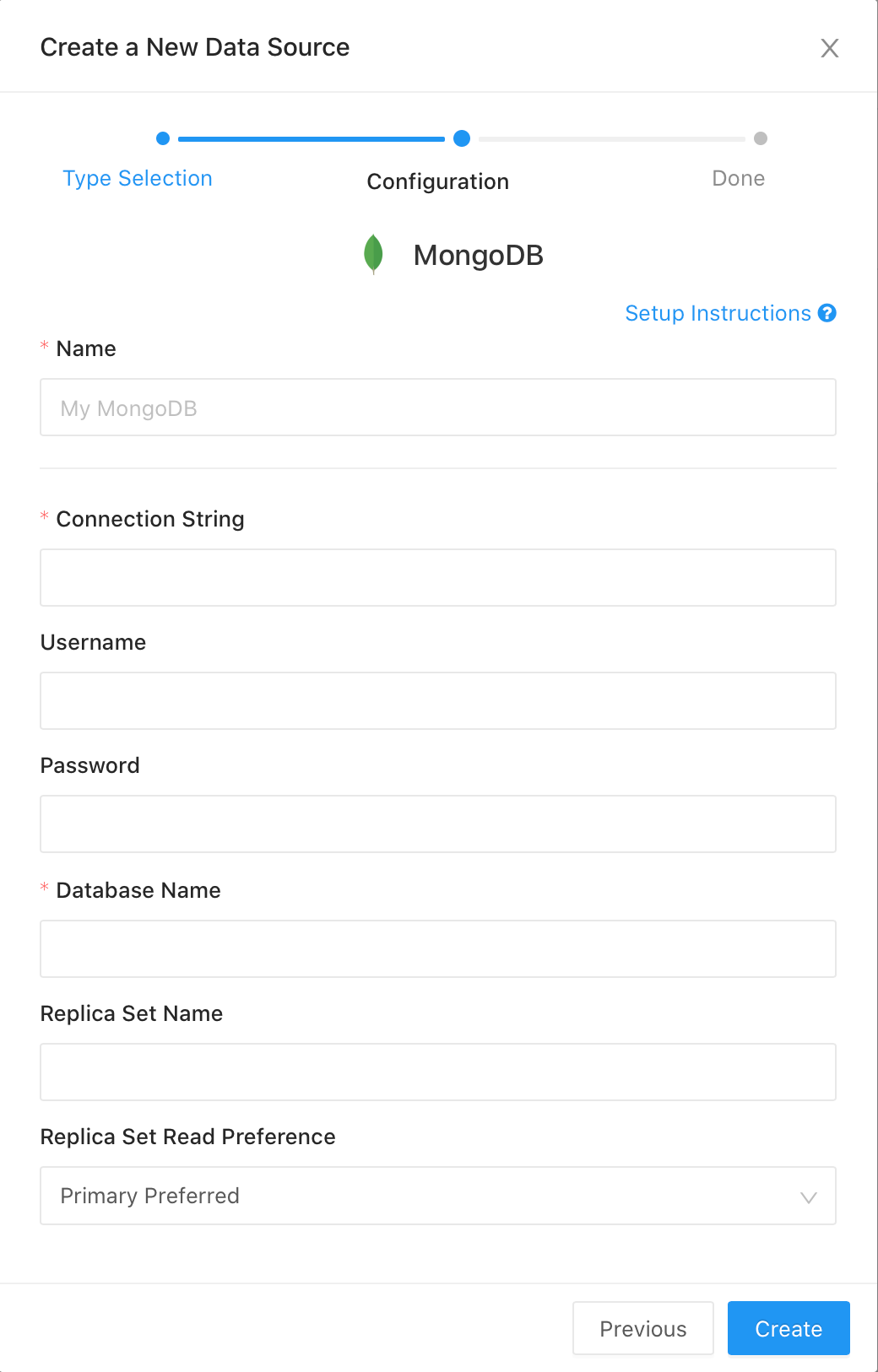
Info: DataReporter V10 adds the Username and Password fields. The intention is to allow users to keep MongoDB passwords secret in the data source configuration. Previously this was not possible as the password would have to be embedded into the Connection String, which was available in plaintext in the UI and REST API.
As of DataReporter V10, if a user supplies the Username and/or Password config field(s), DataReporter will use them to override whatever is set in the connection string when creating the PyMongo client. This allows for existing, pre-patch MongoDB sources to still function, while allowing new/modified MongoDB sources to have secret credentials
MongoDB Atlas
We’ve had issues with users connecting to MongoDB Atlas free tier accounts because they are on a shared environment. For best results, use a connection string of the format:
mongodb+srv://<user>:<password>@<subdomain>.mongodb.net/<database>?retryWrites=true
Troubleshooting
Error: “SSL handshake failed: [SSL: CERTIFICATE_VERIFY_FAILED] certificate verify failed”
This usually happens when your MongoDB server is using self signed certificates. You can either switch to a properly signed certificate or just add the ssl_cert_reqs=CERT_NONE option to your Connection String.
Write your MongoDB query as a JSON object. During execution, DataReporter will convert it into either a db.collection.find() call or a db.collection.aggregate() call. Here’s how your JSON object is mapped and sent to MongoDB:
| MongoDB Token | Where to write in DataReporter |
|---|---|
db | On the data source setup screen |
collection | Add a collection key in your query object |
query | Add a query key in your query object |
projection | Add a fields key in your query object |
.sort() method | Add a sort key in your query object |
.skip() method | Add a skip key in your query object |
.limit() method | Add a limit key in your query object |
db.collection.count() method | Use a count key with any value in your query object |
The values you use for each key are passed unmodified as as parameters to MongoDB.
Querying
Query Examples
Simple Query Example
{
	"collection": "my_collection",
	"query": {
		"type": 1
	},
	"fields": {
		"_id": 1,
		"name": 2
	},
	"sort": [{
		"name": "date",
		"direction": -1
	}]
}
An equivalent query in Javascript would be written: db.my_collection.find({"type": 1}, {"_id": 1, "name": 2}).sort([{"name": "date","direction": -1}])
Count Query Example
{
	"collection": "my_collection",
	"count": true
}
Aggregation
Aggregation uses a syntax similar to the one used in PyMongo. However, to support the correct order of sorting, it uses a regular list for the “$sort” operation that converts into a SON (sorted dictionary) object before execution.
Aggregation query example:
{
	"collection": "things",
	"aggregate": [{
		"$unwind": "$tags"
	}, {
		"$group": {
			"_id": "$tags",
			"count": {
				"$sum": 1
			}
		}
	}, {
		"$sort": [{
			"name": "count",
			"direction": -1
		}, {
			"name": "_id",
			"direction": -1
		}]
	}]
}
MongoDB Extended JSON Support
We support MongoDB Extended JSON along with our own extension - $humanTime:
{
	"collection": "date_test",
	"query": {
		"lastModified": {
			"$gt": {
				"$humanTime": "3 years ago"
			}
		}
	},
	"limit": 100
}
It accepts a human-readable string like the above (“3 years ago”, “yesterday”, etc) or timestamps.
Info: The
$humanTimefunction is also needed when using Query Parameters of type Date or Date/Time with MongoDB, due to the difference between the format DataReporter uses and the one MongoDB expects.When using a Date (or Date Range) parameter, wrap it with a
$humanTimeobject:{{param}}becomes{"$humanTime": "{{param}} 00:00"}(the00:00suffix is needed only with Date parameters, for Date Time parameters you should skip it).
MongoDB Filtering
You can add filters to Mongo queries by projecting a column with the ‘::filter’ keyword added on to the end.
{
	"collection": "zipcodes",
	"aggregate": [{
		"$project": {
			"_id": "$_id",
			"city": "$city",
			"loc": "$loc",
			"pop": "$pop",
			"state::filter": "$state"
		}
	}]
}
The above example will show a ‘State’ column, and allow you to filter on this column.
Troubleshooting
Sort exceeded memory limit of 104857600 bytes
Sort exceeded memory limit of 104857600 bytes, but did not opt in to external sorting. Aborting operation. Pass allowDiskUse:true to opt in.
In MongoDB, the in-memory sorting have a limit of 100M, to perform a large sort, you need enable allowDiskUse option to write data to a temporary files for sorting.
To enable the allowDiskUse option, just add the option to your query:
{
  ...
  "allowDiskUse": true
}